Wednesday, May 25, 2011

Simple perturbation python plug-in


The plugin removes each promoter one by one and performs a simulation to see the consequence of the removal. The plugin also allows the user to perturb RBS strength and mRNA degradation by a given amount. The entire plugin is written in python and the source is available in the TinkerCell home folder.

Sunday, May 8, 2011

Ruby scripts


Users can now write Ruby scripts in TinkerCell. Unfortunately, this feature is only working properly in Linux at present. Hopefully, I will be able to fix it in Windows and Mac.

Sample Octave code for testing nonmonotonicity


target = [0 0.3 1 0.3 0]';
inputs = [0 0.1 0.3 0.5 1]';
outputs = zeros(5,1);
ic = tinkercell.tc_getInitialValues(tinkercell.tc_allItems());
k = tinkercell.tc_getRowIndex(ic, "INPUT");
for i = 1:5
    x = inputs(i);
    tinkercell.tc_setMatrixValue(ic, k, 0, x);
    tinkercell.tc_updateParameters(ic);
    ss = tinkercell.tc_getSteadyState();
    j = tinkercell.tc_getRowIndex(ss, "OUTPUT");
    if (j > -1)
        outputs(i) = tinkercell.tc_getMatrixValue(ss, j, 0);
    end
end
m = [ inputs outputs ];
m2 = toTC(m);
tinkercell.tc_plot(m2, "input-output");
score = corrcoef( target, outputs )

Friday, May 6, 2011

Dialogs with Octave or Python callback functions

#callback function
def myFunc(w,h,output):
print "width = " + str(w) + " height = " + str(h) + " output = " + output

#create the input window with 3 rows and 1 column
inputWindow = tc_createMatrix( 3, 1 )
tc_setMatrixValue(inputWindow, 0, 0, 0)
tc_setMatrixValue(inputWindow, 1, 0, 0.0)
tc_setMatrixValue(inputWindow, 2, 0, 0.0)

#given row names to display
tc_setRowName(inputWindow, 0, "Width")
tc_setRowName(inputWindow, 1, "Height")
tc_setRowName(inputWindow, 2, "Output")
tc_createInputWindowForScript(inputWindow, "Screenshot", "myFunc")

#make the last row a set of options
list = ["Wiki code","HTML code"]
tc_addInputWindowOptions("Screenshot", 2, 0, toTC(list))


Here is the screenshot. When the user clicks the ok button, the callback function is called with the arguments 55, 12, "Wiki code"


Sample python script for doing perturbation experiments

# we are just going to change all the parameters that begin with the phrase 'synthconst'

items = tc_allItems()
params = tc_getParameters(items)


p = ""   #parameter name

#just count how many there are

total = 0  
for i in range(0,params.rows):
    p = tc_getRowName(params, i)
    if p.count('synthconst') > 0:
    total += 1

#for each parameter
j = 0
for i in range(0,params.rows):
    p = tc_getRowName(params, i)
    if p.count('synthconst') > 0:   #check parameter name
        tc_showProgress("DREAM automation", int((100.0 * j)/total))  #progress meter
        j += 1
        #perturb
        s = ""
        FILE = open(p + '.perturb.txt','w+')  #save to file
        p0 = tc_getMatrixValue(params, i, 0)  #original parameter value
        for q in [100, 10, 2, 1]:        #perturbations
            tc_setMatrixValue(params, i, 0, p0/q)
            tc_setParameters(params,0)
            m = tc_getSteadyState() #steady state
            s += str(p0/q)
            for i in range(0,m.rows):  #for each output value
                if tc_getRowName(m,i).count('m') > 0: #if name starts with m
                    s += "\t"
                    s += str(tc_getMatrixValue(m, i, 0))
                    s += "\n"
            FILE.write(s)
            FILE.close()
#done
tc_showProgress("DREAM automation", 100)  #close progress meter

Thursday, April 21, 2011

New book on computational biology

Enzyme Kinetics for Systems Biology

by Herbert M Sauro
published at analogmachine.org

------------------------------------------------------------------------

Book summary:


318 pages, 94 illustrations and 75 exercises

This new monograph introduces students to basic reaction kinetics, including enzyme kinetics, cooperativity, allostery and gene regulatory kinetics. The text introduces a number of modern concepts such as generalized rate laws, elasticities and systems biology thermodynamic quantities. The text is suitable for junior undergraduate level in the US and 2nd year undergraduates in the UK. The text can also be used as a reference text for graduates and other researchers. Click here for the Google books preview.

Tuesday, April 19, 2011

Display Fire!


The simulation tools now display an animated "fire" on top of items after a simulation. The purpose of the fire is to highlight upregulated and downregulated molecules.
The size of the fire is proportional to the final output in the simulation.

These fires can be created from Python or Octave scripts using the tc_burn( item, intensity ) command, where intensity is a number in the range (0,1). From C++, a tool can connect to signals in the LabelingTool (in TinkerCellCore library) in order to create these effects.

The fire feature can be completely inactivated from C++ by setting the LabelingTool::ENABLE_FIRE to false.


Saturday, April 16, 2011

Events


Events can be inserted using the clock icon in the "Inputs" tab at the top. The events table is stored as part of the "global item", which can be accessed in the command-line using "_". The clock icon can be used to edit the Events. In this screenshot, an event is used with the toggle-switch model to try to switch the toggle-switch from one state to the other (didn't work in this model, because the states are quite robust).

Wednesday, April 13, 2011

Optimization and Global Sensitivity

TinkerCell now includes optimization functions for fitting time series data and maximizing or minimizing a given formula. The optimization routines are written in Python but use C++ simulators (copasi). The algorithm is Cross Entropy, which can be used to obtain an estimate of the distribution of parameters. PCA can be used to infer global sensitivities.


A user can write any Python function and optimize it using CrossEntropy. Here is template code:
#objective function for CrossEntropy
def MyObjective():
error = 0.0
#do something here, e.g. call tc_getSteadyState or tc_simulateDeterministic
return error

#optimization parameters
minimize = False
maxruns = 100
numPoints = 100
title = "My Optimization Function"

#optimize
result = CrossEntropy.OptimizeParameters(FitFormula_Objective, title, maxruns, numPoints, minimize)
mu = result[0]
sigma = result[1]
paramnames = result[2]
CrossEntropy.DoPCA(mu, sigma, paramnames)

#set the optimized parameters in the model if you want
n = len(mu)
params = tc_createMatrix(n, 1)
for i in range(0,n):
tc_setMatrixValue(params, i, 0, mu[i])
tc_setRowName(params, i, paramnames[i])
tc_setParameters(params,1)


CrossEntropy.DoPCA will generate a summary file such as the one below.


Thursday, April 7, 2011

Trying different versions of a model

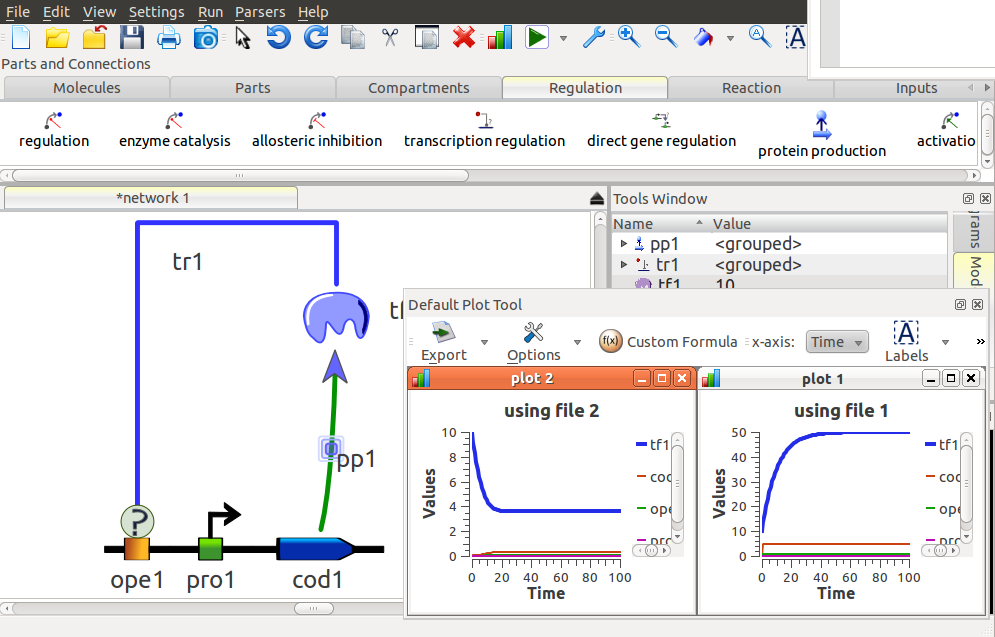
From Python or Octave, it is relatively simple to try different versions of the same network architecture. For example, the diagram below shows a protein regulating itself. The regulation type is "transcription regulation", i.e. it does not specify whether it is positive or negative regulation. The code below the figure simulates both positive and negative feedback using the tc_substituteModel command.


j = tc_find("tr1")

file1 = "/home/deepak/Documents/TinkerCell/Modules/transcription_activation/Equilibrium_Model.tic"

file2 = "/home/deepak/Documents/TinkerCell/Modules/transcription_repression/Equilibrium_Model.tic"

tc_multiplot(2,1)

tc_substituteModel(j, file1)

m1 = tc_simulateDeterministic(0,100,100)

tc_plot(m1, "using file 1")

tc_substituteModel(j, file2)

m2 = tc_simulateDeterministic(0,100,100)

tc_plot(m2, "using file 2")


It is also possible to practically remove a component from the model by substituting "empty" for the model, e.g. tc_substituteModel(j, "empty")